
If your team spends the same amount of time setting up tasks, sending reminders, collecting requests, or sharing updates every day, you’re not alone. These small, repetitive jobs may not seem like much at first, but they quickly take up valuable time that could be spent on more important work.
That’s where Slack templates come in. Instead of building every workflow from scratch, you can use ready-made templates to automate common business processes. Whether you’re collecting approvals, onboarding employees, or managing requests, these templates help your team get started faster and keep work moving without unnecessary back-and-forth.
In this guide, we’ll look at how Slack templates work, the different types of templates available, where they fit into Slack workflows, and how businesses can use them to save time and improve collaboration.
What Are Slack Templates?
Slack templates are pre-built workflow templates that help teams automate common tasks without creating every step manually. They are available within Workflow Builder and provide a quick starting point for processes that many businesses use every day.
Instead of spending time designing a workflow from the beginning, you can choose a template, make a few changes to match your team’s needs, and publish it in just a few minutes. This makes templates a practical option for teams that want to automate work without needing technical expertise.
These templates are designed for everyday business activities such as:
- Employee onboarding
- Time-off requests
- IT support requests
- Expense approvals
- Project updates
- Feedback collection
- Team announcements
- Meeting reminders
Whether you’re managing a small team or a large organization, Slack templates help reduce repetitive work while keeping everyone on the same page.
Why Businesses Use Slack Templates
Before looking at the different template options, it’s helpful to understand why so many organizations rely on them for everyday work.
Save Time on Repetitive Tasks
Many workplace activities follow the same process every day. Instead of repeating those steps manually, Slack templates allow teams to automate them and focus on higher-value work.
Keep Processes Consistent
When everyone follows the same workflow, requests are easier to track, approvals happen faster, and fewer mistakes occur.
Reduce Manual Follow-Ups
Automatic notifications, reminders, and approvals keep work moving without someone constantly checking on progress.
Easy to Customize
Every business works differently. Templates can be adjusted by adding or removing steps, changing notifications, or connecting other business applications.
How Slack Templates Work
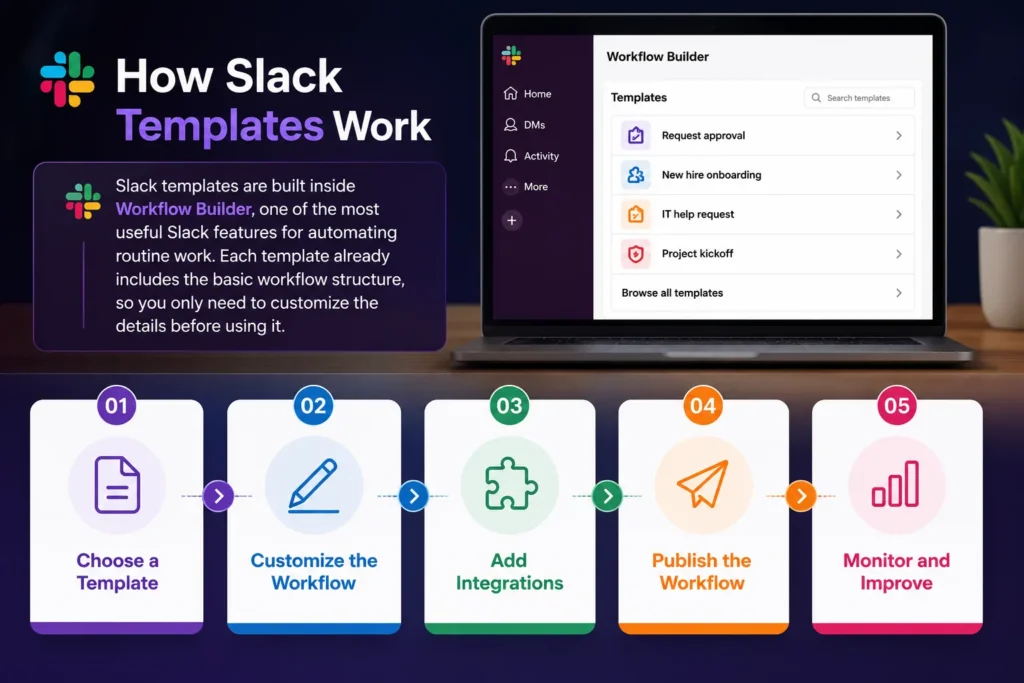
They are built inside Workflow Builder, one of the most useful Slack features for automating routine work. Each template already includes the basic workflow structure, so you only need to customize the details before using it.
The process is straightforward:
Choose a Template
Open Workflow Builder and browse the available Slack templates based on the type of task you want to automate.
Customize the Workflow
Update forms, messages, approval steps, channels, or notifications to match your team’s process.
Add Integrations
Many Slack workflows can connect with other business applications to automatically share information and reduce duplicate work.
Publish the Workflow
Once everything is ready, publish the workflow so your team can start using it immediately.
Monitor and Improve
As your business changes, you can edit workflows anytime to improve efficiency or support new processes.
Popular Slack Templates Available
Slack offers templates for many everyday business activities. Some of the most commonly used include:
Employee Onboarding: Welcome new employees, share important resources, assign onboarding tasks, and notify managers automatically.
Help Desk Requests: Allow employees to submit IT or support requests through simple forms while automatically notifying the right team.
Time-Off Requests: Employees can submit leave requests, managers receive notifications, and approvals happen within Slack.
Expense Approvals: Collect expense information and send approval requests to finance teams without relying on lengthy email conversations.
Daily Stand-Up Updates: Team members submit daily progress updates through automated prompts, making project tracking much easier.
Feedback Collection: Gather employee or customer feedback using structured forms and route responses to the appropriate teams.
These ready-made Slack templates help businesses start automating work quickly without creating every process from scratch.
Getting More Value from Slack for Business
Using templates is only one part of improving workplace collaboration. When combined with automation and the right migration strategy, businesses can get much more from Slack for business.
Connecting Templates with Slack Workflows
Templates become even more useful when they are connected with larger Slack workflows across departments.
For example:
- HR can automate employee onboarding
- Finance can automate expense approvals
- Sales teams can automate deal notifications
- IT teams can automate support ticket requests
- Marketing teams can automate campaign approvals
Instead of isolated tasks, these connected Slack workflows help departments work together more efficiently.
Using Slack Automation Tools
Many organizations combine Slack templates with Slack automation tools to reduce manual work even further.
These tools can:
- Send automatic reminders
- Create approval chains
- Update project status
- Connect CRM systems
- Notify teams instantly
- Collect business data automatically
Together, Slack templates and Slack automation tools help businesses spend less time managing routine work and more time completing meaningful tasks.
Planning to Move to Slack?
If your organization is currently using Microsoft Teams, Google Chat, or another collaboration platform, switching doesn’t have to be complicated.
A structured migration approach helps you move conversations, users, channels, and important business data while minimizing disruption to your team. Solutions like Move to Slack simplify the transition by supporting a smooth migration process, allowing employees to continue working with minimal downtime.
Once your migration is complete, your team can immediately begin using Slack templates, Slack workflows, and other Slack features to automate everyday processes and improve collaboration from day one.
Conclusion
Modern businesses don’t just need better communication, they need smarter ways to manage everyday work. Slack templates make that possible by giving teams a faster way to automate common processes without building workflows from scratch.
Whether you’re onboarding employees, collecting approvals, or sending reminders, these ready-made templates help reduce repetitive work while keeping teams organized. Combined with Slack workflows, Slack automation tools, and the many Slack features available, they create a more efficient workplace where everyone can stay focused on work that matters most.
As more organizations continue adopting Slack for business, using templates is one of the easiest ways to improve productivity, maintain consistency, and help teams work together more effectively.
If you’re planning to migrate to Slack and want a smooth transition without disrupting your team’s work, talk to a Slack Integration Expert and discover how Move to Slack can help make your migration simple and hassle-free.
Frequently Asked Questions
Slack offers templates for employee onboarding, leave requests, IT support, expense approvals, project updates, feedback collection, meeting reminders, and team announcements. These templates help businesses automate routine processes with minimal setup.
Yes. Slack templates can be customized by editing forms, approval steps, notifications, channels, and integrations, allowing each department to tailor workflows to its specific needs.
Slack templates are available in Workflow Builder, where users can browse pre-built workflows, customize them, and publish them for their teams to use.
Slack templates can automate a wide range of processes, including employee onboarding, approval requests, help desk tickets, daily stand-ups, expense management, feedback collection, and recurring reminders.
Yes. Slack templates can integrate with various business applications and automation tools, allowing teams to sync data, trigger notifications, streamline approvals, and reduce manual work across multiple systems.