Slack is changing how teams work by bringing conversations, files, business apps, workflows, and automation into one connected workspace. Instead of constantly switching between tools, employees can keep more of their daily work in one place.
What makes Slack more useful today is not just messaging. Teams can connect their existing business tools, automate repetitive tasks, search across workplace information, and use intelligent assistance to find answers faster and keep work moving without endless back-and-forth.
For businesses considering a move to Slack, the real question is no longer whether it can replace workplace chat. It is whether one connected platform can reduce tool-hopping, simplify collaboration, and make everyday work easier. Let’s look at what is driving that shift.
Why Businesses Prefer Slack for Workplace Collaboration
There are quite a few reasons businesses are moving toward Slack workplace, and it is not only because everyone likes having another place to send messages.
What attracts teams is what happens around those conversations, the automation, integrations, intelligent search, customer workflows, and the ability to bring actual work into the same place.
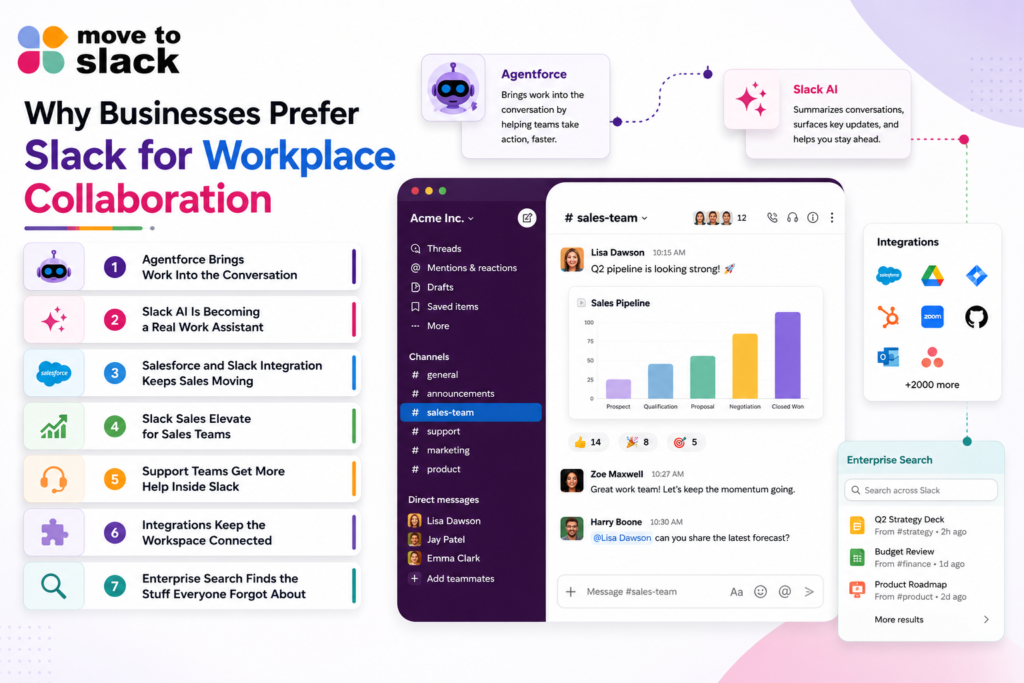
Agentforce Brings Work Into the Conversation
One of the biggest changes is how Salesforce and Slack are coming together.
With Agentforce in Slack, teams can work with agents directly inside channels, DMs, and threads. These agents can answer questions and take actions, while using relevant business context instead of making employees jump between different systems.
This makes Slack for Workplace feel less like a communication tool and more like somewhere work can actually happen.
Slack AI Is Becoming a Real Work Assistant
Slack AI is also moving beyond the basic “summarise this conversation” type of thing.
Slackbot can work with conversations, connected apps, and Salesforce information, while enterprise search can bring together messages, files, and business data so people can find what they need without going on a little treasure hunt across five different applications.
In July 2026, Slack highlighted updates where Slackbot can create presentations, build dashboards, and help with Salesforce actions, while Salesforce channels can also be created through Slackbot prompts.
For a business, this means Slack for Workplace can become a place where people ask for information and get moving instead of spending half the morning looking for it.
Salesforce and Slack Integration Keeps Sales Moving
Sales teams are another big reason businesses look at Slack workplace.
Salesforce and Slack can be connected so teams can work with CRM information inside their normal flow of work, including Salesforce channels, customer information, and Agentforce experiences.
That means salespeople do not always need to open Salesforce just to check something small, update a record, or catch up on an account.
Slack Sales Elevate for Sales Teams
Slack Sales Elevate brings people, processes, apps, and Salesforce Sales Cloud information together for sales teams.
Sales leaders can also get visibility into deal progress, pipeline changes, and important sales metrics inside Slack, which is pretty useful when the sales team is already spending most of its day there.
This is one of those features where the benefit becomes obvious once you actually use it, because nobody enjoys switching between six tabs just to understand what is happening with one deal.
Support Teams Get More Help Inside Slack
Support is another area where this setup can become useful.
Agentforce can handle specific tasks and answer questions directly in Slack, and Slack’s Help Center also uses Agentforce to answer questions before connecting users with human support when needed.
That means teams can get help without always leaving the workspace, and the people handling support can keep more of their work in one place.
Integrations Keep the Workspace Connected
Another reason businesses prefer Slack for workplace is the number of systems that can sit around it.
CRM, project management, customer support, file storage, productivity tools, and AI agents can all become part of the same working environment. Slack is also continuing to expand its agent ecosystem, including third-party AI agents and connected business applications.
This matters because businesses rarely use one application for everything. They use many, and Slack can become the place where those systems meet.
Enterprise Search Finds the Stuff Everyone Forgot About
Enterprise search is another feature that becomes surprisingly important once a company gets bigger.
It can bring together company knowledge from messages, files, and connected applications, making it easier to find information that would otherwise be buried somewhere inside an old channel or another business system. And yes, finding an old file without asking three people where it went is already a productivity improvement.
The Smarter Way to Switch to Slack
If your business has decided that it is time to move, choosing the right Slack migration process matters just as much as choosing Slack itself.
A proper migration should bring important business information across in an organised way, while also taking care of users, conversations, files, channels, permissions, and the other details that nobody wants to discover are missing after the move.
This is where the Move to Slack solution can help. It is designed to support businesses through the migration process, making the move more structured instead of turning it into one giant “let’s hope everything appears” exercise.
- Move important Slack data into the new environment
- Support structured Slack data migration
- Help teams plan the migration before making the move
- Keep the migration process easier to manage
- Support businesses moving from existing collaboration environments
- Help teams prepare for a smoother transition
And before moving forward, it is also worth knowing how much time the project may actually take. The Slack timeline generator can help businesses get a clearer idea of the migration timeline based on their requirements.
Conclusion
The reason businesses are choosing Slack for Workplace is changing.
It is no longer only about messaging teams faster. It is about bringing conversations, connected applications, search, automation, customer work, and intelligent agents closer together.
With Slack becoming more agent-focused and more connected to the wider technology stack, the platform is turning into something much bigger than a communication tool.
So, if your current workplace setup feels scattered, switching may be worth considering. And when you decide to migrate to Slack, the migration itself should not become the new headache.
Frequently Asked Questions
Businesses should audit users, channels, files, permissions, integrations, and data requirements first. A structured migration plan, supported by Move to Slack, helps reduce disruption and surprises.
Migration timelines depend on data volume, users, channels, permissions, and source platforms. A Slack timeline generator can provide an initial estimate before teams commit resources.
Companies should identify essential data, inactive content, critical channels, integrations, and user requirements. Prioritizing these areas helps create a cleaner transition and supports better adoption after migration.
Review legacy data for relevance, retention requirements, duplicates, inactive content, and access needs. Cleaning unnecessary information before migration can create a more organized Slack workplace from day one.
User count, data volume, source environment, channel structure, permissions, integrations, customization, and validation requirements can affect timing. A Slack timeline generator helps teams estimate project duration more realistically.