At some point, every growing team reaches that slightly annoying stage where email threads are everywhere, meetings keep multiplying, and finding one important update becomes a small detective project.
This is where Slack for business starts looking interesting. It brings conversations, files, workflows, and the tools teams already use into one working space, instead of making people jump between ten different tabs all day. Slack itself describes its business platform around connecting employees, managing daily work, and keeping operations moving.
But is it actually right for your organization? That depends on how your teams communicate, how many tools you already use, and whether you want collaboration to be more connected rather than simply adding another chat app.
What Makes Slack Useful for Modern Businesses?
Slack for business is not really just about sending messages faster. The bigger idea is bringing people, information, applications, and everyday work into the same place, which can make a surprisingly big difference.
Connects People and Software in One Place
Teams usually use a lot of software. CRM, project management, file storage, customer support, calendars, development tools, and then there are probably a few tools nobody remembers who originally added.
Slack can connect these systems so updates and useful information can appear where teams are already communicating. Slack currently supports more than 2,600 apps, including tools such as Salesforce, Google Drive, Asana, Jira, Box, and many others.
With Slack for business, this means employees do not always have to leave their workspace just to check something or complete a small task.
Collaboration Becomes More Organized
Instead of having one giant group conversation where everything gets mixed together, teams can create channels around projects, departments, customers, or specific work.
A sales team can have its own channel, a product launch can have another, and a customer project can have its own little corner too.
This sounds simple, but when the number of people and projects starts increasing, having conversations in the right place becomes very useful.
Automation Takes Care of the Small Stuff
Slack includes Workflow Builder, which lets teams create workflows and connect applications without needing to build everything from scratch. For example, a workflow can create a Salesforce record or add information to a Google Sheet directly from Slack.
Therefore, Slack for business can be used for more than communication. It can also help move routine work along, which is usually where people lose time without even noticing it.
Slack works with Microsoft tools including Outlook, OneDrive, SharePoint, Azure, and Microsoft Teams. Teams can connect Outlook Calendar with Slack, while OneDrive and SharePoint files can be shared and previewed inside conversations.
This is especially useful for organizations that already have a Microsoft-heavy setup but want a different collaboration layer.
Useful for Customer-Facing Teams Too
Customer conversations rarely belong to only one department. Sales might know one thing, support knows another, and the product team has some completely different context sitting somewhere else.
Slack can bring these conversations together and connect customer-facing tools such as Salesforce Sales Cloud and Service Cloud, allowing teams to receive updates and work with customer information from their collaboration environment.
That shared context can make a customer issue much easier to handle because people are not constantly asking, “Wait, who has that information?”
AI and Enterprise Search Bring Another Layer
Modern Slack is also moving beyond traditional team messaging. Enterprise search can search across conversations, files, connected apps, and business systems, while Slackbot and AI features can help employees find information and work with the context already available to them.
For larger organizations, this matters because information often exists somewhere, but finding that “somewhere” is the actual problem.
Security and Administration Matter as Teams Grow
Slack also includes business controls such as SSO, SCIM user management, encryption at rest and in transit, access logs, device management, and other security capabilities depending on the subscription.
Enterprise+ adds features such as multiple SAML configurations, enterprise mobility management, and native data loss prevention.
This becomes particularly important when more employees, applications, files, and external collaborators start entering the same environment.
It Can Work for Small Teams Too
Slack for small business can be useful when a team wants something more organized than scattered email conversations but does not need a huge collection of complicated systems.
The same basic idea applies to Slack for startups. Teams can create channels, connect the tools they already use, automate repetitive tasks, and build their working environment gradually instead of setting up everything at once.
Migrate to Slack Without Disruption
Moving an established team to a new collaboration environment is a different story from simply creating a new workspace.
A Slack migration may involve users, conversations, files, channels, permissions, and other workspace information, so planning the move properly matters. Nobody wants to announce a shiny new workspace and then discover that half the important history is sitting somewhere else.
A proper Slack data migration should therefore be planned around what needs to move, how users will access the new environment, and how the transition will happen without creating unnecessary confusion.
For organizations planning to migrate to Slack, tools such as Move to Slack can make the transition much smoother by helping businesses handle the migration process in a more structured way.
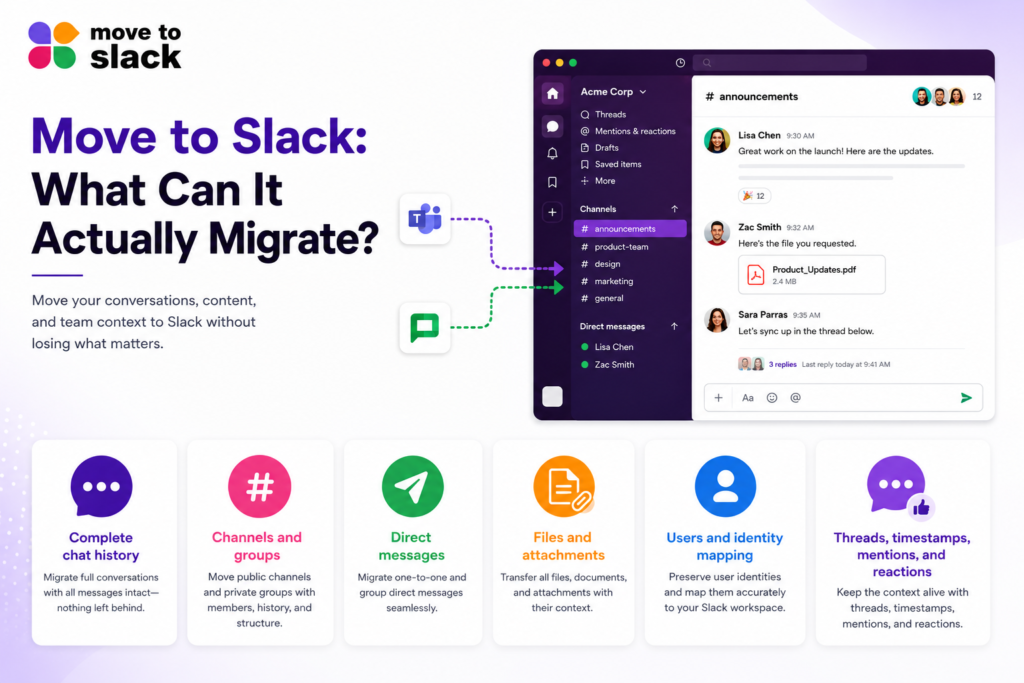
Move to Slack: What Can It Actually Migrate?
- Complete chat history — Move conversations, messages, replies, and threaded discussions while keeping the original context intact.
- Channels and groups — Migrate public and private channels, along with their structure, memberships, and relevant permissions.
- Direct messages — Transfer 1:1 and group conversations with their complete history, so important discussions do not simply disappear during the move.
- Files and attachments — Move documents, images, videos, and other attachments while preserving related metadata and connecting them back to the right conversations.
- Users and identity mapping — Match users between the source platform and Slack so migrated messages remain associated with the right people instead of showing up under random migration accounts.
- Threads, timestamps, mentions, and reactions — Preserve conversation structure, original timestamps, @mentions, reactions, and pinned messages so the old conversations still make sense after migration.
Additionally, Move to Slack supports automated mapping, real-time migration tracking, phased and delta migrations, and validation before go-live. Thus, teams can keep working while the migration runs in the background instead of putting everything on pause.
And one more important thing: the platform also maintains transparency by ensuring that migrated content is not retained on its servers after the job, following a zero-retention approach, with security and compliance processes aligned with SOC 2, HIPAA, and GDPR requirements.
Conclusion
Slack for business can be a strong option for organizations that want communication, applications, automation, and collaboration to work more closely together.
It becomes even more useful when teams are already using tools such as Salesforce and Microsoft 365 and want those systems to work alongside everyday conversations rather than staying in separate little boxes.
And when the time comes to move existing information, planning the Slack migration process properly is just as important as choosing the platform itself.
For smaller organizations, Slack for small business can provide a more organized way to communicate as teams grow. For newer companies, Slack for startups can also provide the flexibility to connect tools and workflows without creating a huge communication setup.
With the right approach and tools such as Move to Slack, businesses can migrate to Slack with much less disruption and give their teams a cleaner place to work, collaborate, and actually find the information they need.
Frequently Asked Questions
Slack for business centralizes conversations, updates, and teamwork, helping distributed employees stay aligned. Move to Slack can further support a smoother transition when organizations consolidate collaboration into Slack.
Yes. Slack for small businesses can organize growing conversations through structured channels and integrations. Move to Slack helps businesses transition existing collaboration data without disrupting established workflows.
Slack for startups can provide flexible communication as teams expand, while integrations and automation support evolving workflows. Move to Slack helps startups migrate existing information into Slack efficiently.
Yes, businesses can migrate to Slack while operations continue when migrations use phased or delta approaches. Move to Slack supports background migration strategies that minimize interruptions to daily work.
Organizations can compare migrated users, channels, messages, files, permissions, and conversation structures against source data. Move to Slack provides validation capabilities to identify issues before final Slack adoption.